
Interactive tools
Create Word Clouds Online
How to Use Word Clouds in the Classroom: Boost Interaction & Active Participation
A strong visual says more than a thousand words: collect ideas, visualise opinions and give participants a voice. In just a few seconds you create a shared snapshot of the room that grabs attention and sparks conversation. Suited to classrooms, meetings, training sessions, live presentations and workshops, both in person and online.
Get started for free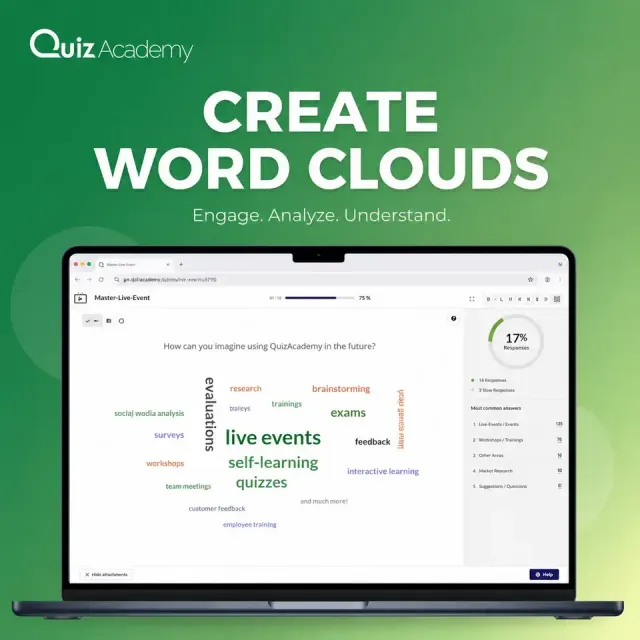
What is a word cloud – and why does it work so well?
A word cloud is a quick way to make many voices visible at once. Participants type in their answers spontaneously, and the terms mentioned most often appear larger and in the centre. In seconds you get a snapshot of opinion that shows the whole group at a glance. You can see what the group thinks: live, anonymously and clearly.
Key benefits of word clouds
- Participants get a voiceAnonymous and without fear of judgement, so quieter participants join in too.
- Instant focus on the topicFrequent terms stand out immediately.
- Insights you can use at onceResults can be picked up directly and woven into the conversation.
- Visual engagementColourful, intuitive and easy to follow.
A word cloud in the classroom works well as an opener, or as an energiser at any point of your workshop or lesson: as a welcome activity, a creative break in a workshop or a closing feedback round. Engagement goes up, the atmosphere becomes more personal and you take away input from the group.
Tip: Use a live word cloud whenever you want to surface opinions, ideas or expectations.
Where you can create a word cloud
Creating a word cloud makes sense wherever people need to exchange ideas, get involved or brainstorm together, from a small team meeting to a keynote in front of a large audience. Thoughts become visible and moments of dialogue arise. Word-cloud polls fit any situation in which you need quick feedback, a fast vote or a structured way to collect ideas.
Typical situations at a glance
| Situation | Example question | Objective |
|---|---|---|
| Kick-off meeting | “What do you expect from today’s meeting?” | Involve participants from the start |
| Workshop start | “Which words do you associate with [topic]?” | Make prior knowledge and associations visible |
| Presentation or lecture | “What is your first thought on this topic?” | Increase attention and interaction |
| Feedback round | “What was the most important takeaway for you?” | Encourage reflection and round off the meeting |
| Team check-in | “What is on your mind this week?” | Gather the mood of the team |
| Employee survey | “What motivates you at work?” | Capture perceptions and drivers |
| Anonymous questions | “What would you like to ask the management?” | Allow open feedback without names |
With sensitive topics such as satisfaction or well-being, anonymous input can make answering easier, because nobody has to reply under their own name.
Tip: Ask open, concrete questions that invite a wide range of short answers. That is how you get a word cloud with meaningful terms.
Step by step: create a word cloud the easy way
You do not need complex software or training. A word cloud is set up in a few minutes:
- Define your question: keep it focused and easy to understand.
- Choose your tool: for example in the browser, or built into a platform such as QuizAcademy.
- Share access: participants join via a link or QR code and type their terms in the web version or in the app.
- Collect answers: live in the room or over a set period.
- Present and discuss the results: the word cloud shows which terms were mentioned most often.
In QuizAcademy you set up the word cloud in a live event: open your live events in the left CMS menu, add a survey with a free-text question and choose the template “Word cloud”. You can then export the results of a live event as an Excel or PDF file for your documentation, a recap email or follow-up slides. A detailed guide is available in the QuizAcademy Academy (in German).
Avoid these mistakes: how to make your word cloud a success
With a few simple tweaks you can turn a good idea into a word cloud that works well in your live event:
Avoid these mistakes
- Vague questions: phrase them concretely and in plain language.
- Low participation: announce the question early and explain how to join.
- Answers that are too long: set a maximum number of characters per answer and ask for one-word answers.
- Unsuitable entries: keep an eye on the results and put them in context where needed.
- Duplicates and typos: ask participants to use one consistent spelling.
Tip: Test your word cloud yourself beforehand, so the start in front of the group runs smoothly.
Using word clouds in modern presentations
Whether in small teams or large groups, a live word cloud gets participants involved quickly. It is low-barrier, works without an account for participants and makes presentations more lively. Teams use it for mood checks, quick feedback, icebreakers and retrospectives.
- Instant visual feedbackOpinions and moods are visible without a detour through an evaluation.
- Ideas in real timeTerms appear live, so you can pick up impulses on the spot.
- Quiet voices count tooQuieter participants contribute anonymously.
Word clouds with QuizAcademy: live in the browser
QuizAcademy is a GDPR-compliant platform from Germany. In a live event you start a survey, share access via a link or QR code and display the results as a live word cloud. As a word cloud question in an exam you can also collect terms over a set period. Participants need no account, only you as the teacher or host register. Registration is free of charge, and the free plan includes live events with up to 10 participants each. You will find more on this on the page about live word clouds and further ways to use QuizAcademy in the overview of use cases, and the German-language version of this topic in the article Word Cloud erstellen.
Ready for your first live word cloud?
Create your first word cloud in a live event and watch the terms from your group grow in real time. Registration is free of charge, and participants need no account.
In use at





FAQ: How to use word clouds successfully in seminars, meetings and workshops
Why should I create a word cloud?
A live word cloud makes opinions, ideas and the overall mood visible at once, in a way that stands out and connects people. In live events and workshops it encourages participation and gives you signals from the group right away. Because participants answer anonymously, quieter people can contribute as well, and you can pick up the most frequent terms straight away in the conversation.
How does creating a word cloud work technically?
Participants open the live event via a link or QR code and type their terms in the web version or in the app. The terms mentioned most often automatically appear larger, so a live word cloud builds up in real time. Participants need no account, and you set up the question beforehand as a survey in a live event in the QuizAcademy CMS.
When is a word cloud especially worthwhile?
A word cloud works well wherever you want to collect short answers from a group quickly: as an opener in a kick-off, for brainstorming and idea collection in workshops, for mood checks in team meetings, for feedback rounds at the end of a training and for anonymous answers on sensitive topics. Ask an open, concrete question, so that participants can reply with a single term.
How many terms can each person submit?
You decide this when you set up the question. In QuizAcademy you can set a maximum number of characters per answer for free-text questions. That gives you short, concise terms instead of long sentences, and the word cloud stays clear. For live word clouds we recommend asking participants for one-word answers.
What if inappropriate words are submitted?
Keep an eye on the results while the word cloud builds up and put unsuitable entries in context in the discussion. In QuizAcademy you can also activate the option “Zufallsnamen verwenden” in live events, so that participants choose from approved name variants and you avoid unwanted usernames. A short ground rule at the start also helps to keep the word cloud respectful.
Can I reuse the word cloud after the poll?
Yes. You can export the results of a live event as an Excel or PDF file and use them for follow-up, presentations or documentation. You do not need any additional software for this. A short recap email or a follow-up slide with the most frequent terms is a simple way to close the meeting.
Where can I create a poll with a word cloud?
QuizAcademy offers word clouds directly in the live event and as a word cloud question in an exam, without separate software. Access runs via a link or QR code, participants type in the web version or in the app, and in a live event participants see the result immediately. You can find more on the page about live word clouds and further ways to use QuizAcademy in the overview of use cases.
Are the answers in the word cloud anonymous and GDPR-compliant?
Participants need no account and enter no personal data, so their entries in the word cloud are anonymous. In live events they use a username, which can be anonymous. QuizAcademy is a provider from Germany, and the data is stored on servers in Germany (data minimisation under the GDPR). Please still ask participants not to enter personal details. More in the privacy policy.